HP 230
HP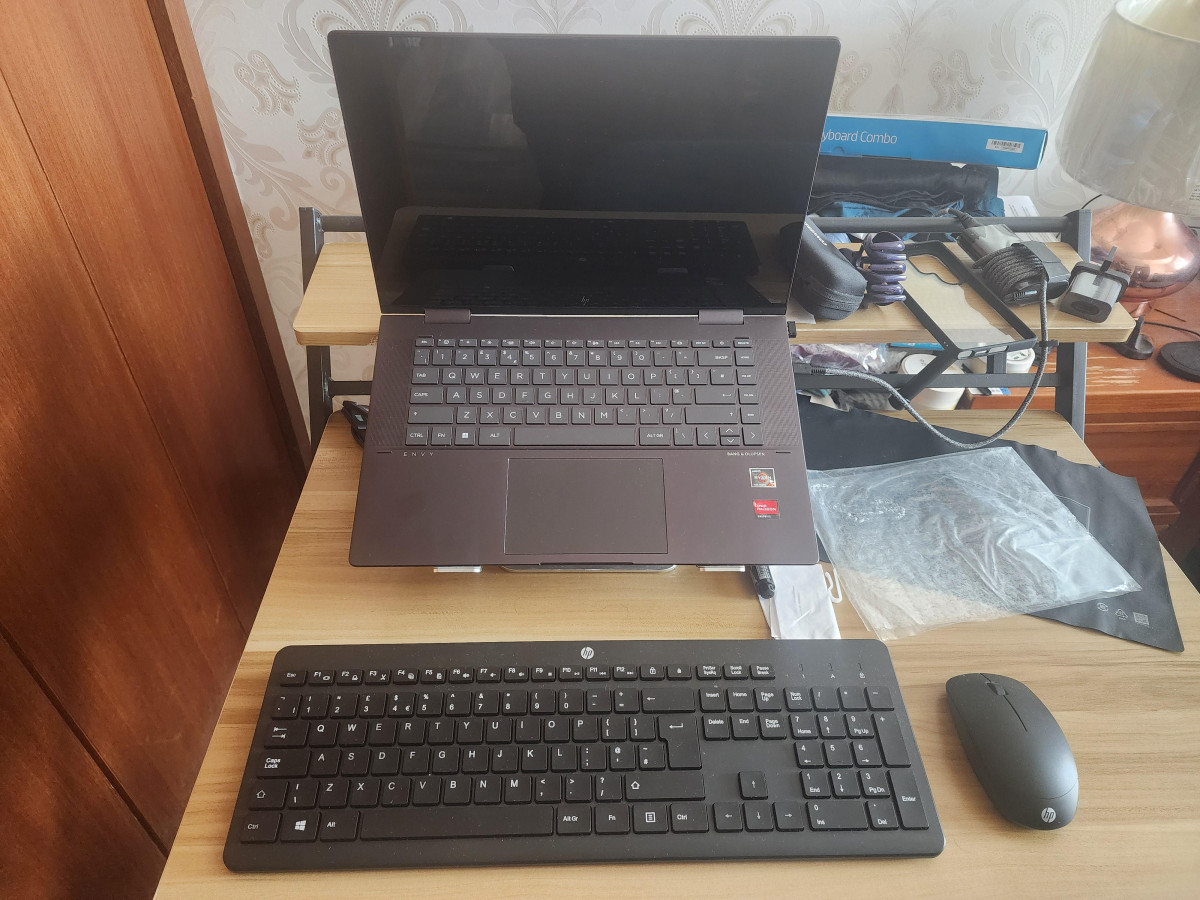
First Impressions: A No-Nonsense Desk Upgrade
Cables tangled behind a monitor, a mouse that skips across the desk, batteries that die without warning — these are the small frustrations that make a basic desk setup feel more annoying than it should. The HP 230 Wireless Mouse and Keyboard exists to remove exactly those irritations, and it does so without asking you to learn new software, charge anything overnight, or pay a premium for features you'll never touch.
This is a combo built for people who just want their keyboard and mouse to work quietly in the background while they get on with everything else — emails, spreadsheets, browsing, schoolwork, basic day-to-day computing. It isn't chasing gamers or graphic designers, and it isn't trying to be clever. That restraint is actually its biggest selling point, and it's worth understanding exactly where that simplicity pays off and where it starts to show its limits.
Design and Build Quality
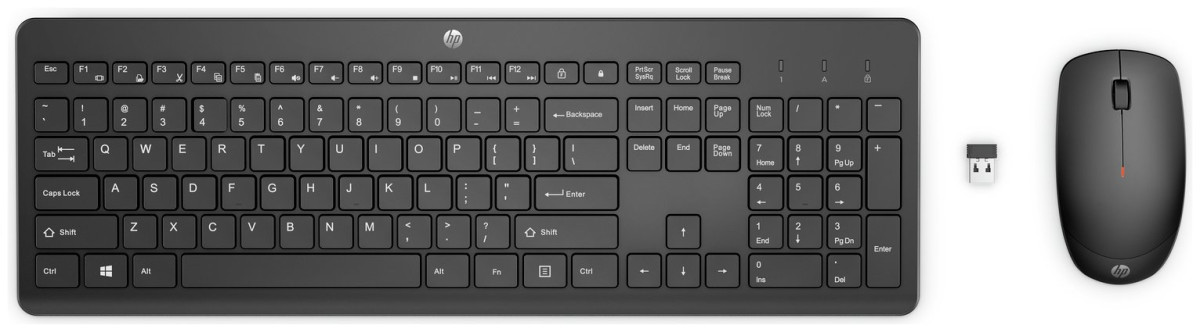
The keyboard uses what's known as a chiclet layout — individual, slightly spaced-out square keys rather than the tightly packed, rounded keys you'd find on an older-style board. Each key sits on a shallow, low-travel mechanism, meaning your fingers don't have to press down far to register a keystroke. In practice, that translates to two things: quieter typing (no loud, hollow clacking that carries across a shared room or office) and a flatter, more modern-looking profile that sits low against the desk.
At full width with a numeric keypad included on the right-hand side, this is a proper full-size board rather than a compact one — you get dedicated arrow keys, Home/End/Page navigation, and a complete number pad for anyone doing regular data entry or spreadsheet work. It's finished entirely in black and has an ergonomic profile designed to keep wrists in a natural position during longer sessions, though it's worth noting there's no palm rest included, which is standard at this end of the market.
The mouse follows the same understated design language. It's a compact, right-hand-friendly shape with a smooth optical sensor on the underside, a scroll wheel, and a small LED that lights up to flag when the battery is running low — a genuinely useful touch that a lot of budget mice skip entirely. Build quality across both pieces feels appropriately solid for the price bracket: nothing feels premium, but nothing feels flimsy either, and the plastics used have a matte, fingerprint-resistant finish rather than a cheap glossy one.
Typing Experience: How the Keyboard Actually Feels
The standout functional feature here is the shortcut row along the top of the keyboard. Instead of digging through menus to adjust volume, launch a browser, or control media playback, a single press of the corresponding key handles it — all twelve of the function-row keys double as instant shortcuts. For anyone who spends their day switching between tasks, that's a small but constant time-saver that adds up over weeks of use.
Typing feel is soft and forgiving rather than crisp and tactile. The shallow key travel means less finger fatigue over long typing sessions, and the quieter acoustic profile is a genuine benefit if you're working near others, on a video call, or typing late at night without wanting to wake anyone up. It won't satisfy anyone who prefers the deeper, more mechanical feel of a gaming or premium typing keyboard, but for general word processing, browsing, and messaging, it's comfortable and easy to adapt to almost immediately.
One detail worth flagging for UK buyers specifically: this version ships with a proper UK key layout, including the pound sign and correctly positioned punctuation keys, so there's no need to hunt for a separate regional variant.
Mouse Performance and Precision
The mouse relies on an optical sensor with adjustable sensitivity up to 1600 DPI. In plain terms, DPI (dots per inch) measures how far the cursor moves on screen relative to how far you physically move the mouse — a higher number means the cursor travels further and faster for the same hand movement. At the upper end of its range, this mouse is sensitive enough for quick, sweeping cursor movements across large or multiple monitors; dialled down, it's precise enough for detail work like photo cropping or spreadsheet cell selection. It won't match a dedicated productivity or gaming mouse for fine-grained precision, but for everyday clicking, dragging, and scrolling, tracking is smooth and consistent without noticeable lag or skipping.
Three physical buttons (left click, right click, and a clickable scroll wheel) cover the basics without overcomplicating things — there are no side buttons or programmable extras here, which is entirely in keeping with what this product is designed to do.
Setup and Wireless Connectivity
Both the keyboard and mouse pair to a single small USB receiver, sometimes called a nano receiver because of its compact size — small enough to leave permanently plugged into a laptop's USB port without it looking out of place. There's no software to install, no Bluetooth pairing menu to navigate, and no separate receivers to keep track of for each device. Plug it in, switch the devices on, and they connect automatically.
The wireless signal operates over a 2.4GHz connection with a working range of up to 10 metres (around 33 feet), which comfortably covers a typical desk setup, a living room sofa a few feet from a TV-connected PC, or a small meeting room. Most users will never test the outer edge of that range, though it's fair to say wireless range figures like this represent best-case conditions — thick walls, other wireless devices nearby, or a receiver tucked behind a metal desktop tower can shave a bit off the practical distance in reality.
Battery Life: How Long It Really Lasts
This is one of the combo's genuine strengths. The keyboard runs on two AAA batteries and is rated for up to 16 months of use before a replacement is needed; the mouse takes a single AA battery and is rated for up to 12 months. Every battery required — three in total — comes included in the box, so there's no scramble to find the right size before you can start using it.
Up to 16 months
Keyboard (2x AAA batteries included)
Up to 12 months
Mouse (1x AA battery included)
Framed against daily habits, that means the average user is looking at swapping keyboard batteries roughly once a year, and mouse batteries slightly more often than that — a dramatically lower-maintenance proposition than rechargeable wireless peripherals that need topping up every week or two. The mouse's low-battery LED indicator also means you get an early warning rather than a sudden, inconvenient dropout mid-task.
It's worth noting that quoted battery life figures assume moderate daily use; anyone running the mouse almost constantly across a long working day, or leaving devices powered on unnecessarily overnight, should expect somewhat shorter real-world life than the ceiling figure suggests.
Compatibility: What It Works With
The combo is built around a standard USB-A receiver, which makes it broadly compatible with Windows machines running Windows 7 through the current releases, as well as Mac computers on modern macOS versions. If your desktop or laptop has a free USB-A port, there's a very good chance this will simply work without hunting for drivers.
It's worth being clear-eyed about the edges of that compatibility, though. This isn't a Bluetooth device, so it won't pair with USB-C-only laptops or tablets without an adapter, and it isn't designed or officially supported for use with games consoles — while some users have reported it technically functioning when plugged into a console's USB port, that's not a use case HP designs or tests for, and menu navigation on a console tends to behave unpredictably with a standard PC-style keyboard and mouse. Treat it strictly as a computer accessory, not a console controller substitute.
Who This Combo Is Actually For
A strong fit for
- Home office workers who spend most of the day typing, browsing, and using spreadsheets or documents
- Anyone replacing a broken or wired combo who wants a straightforward, drop-in upgrade
- Shared or quiet spaces — open-plan homes, libraries, late-night sessions — where a quieter keystroke sound matters
- Buyers who want long battery life without thinking about charging cables
- Anyone setting up a secondary or budget PC, a family computer, or a spare desk
Less suited to
- Gamers who need fast response times, programmable buttons, or a high-refresh wireless connection
- Designers, video editors, or anyone doing precision cursor work that benefits from a higher-end sensor
- Anyone wanting per-key backlighting, since these keys are not illuminated
- Buyers specifically wanting a split or heavily contoured ergonomic shape, since this follows a conventional flat layout rather than a wrist-angled design
How It Stacks Up Against Other Budget Combos
The most natural point of comparison is the Logitech MK270, a long-running budget combo that occupies almost exactly the same shelf space and price bracket.
| Feature | HP 230 | Logitech MK270 |
|---|---|---|
| Keyboard layout | Full-size with number pad | Full-size with number pad |
| Shortcut/hotkeys | 12 shortcut function keys | 8 media hotkeys |
| Mouse sensor | Adjustable up to 1600 DPI | Fixed at 1000 DPI |
| Mouse battery indicator | Yes (LED) | No |
| Keyboard battery life | Up to 16 months | Up to 36 months |
| Mouse battery life | Up to 12 months | Up to 12 months |
| Connection | Single 2.4GHz USB receiver | Single 2.4GHz USB receiver |
| Wireless range | Up to 10 metres | Up to 10 metres |
The pattern that emerges is a genuine trade-off rather than one product simply beating the other. The HP 230 offers a more sensitive, adjustable mouse and the reassurance of a battery warning light, plus a few more dedicated shortcut keys. The Logitech MK270 counters with a keyboard battery rated to last more than double as long, though its mouse tracking is fixed and less flexible. For most buyers, the deciding factor will come down to whether adjustable mouse sensitivity or longer keyboard battery life matters more day to day — neither combo pulls dramatically ahead of the other on price or core usability.
Buyers who need a genuinely ergonomic, wrist-angled design, or backlit keys for low-light typing, should look outside this budget tier altogether, since neither of these combos — nor most products at this price — offer those features.
Strengths and Weaknesses: The Honest Picture
The case for this combo rests on consistency rather than any single standout feature. Setup genuinely is as simple as advertised, and that matters more than it might sound — a huge number of buyers in this category just want to plug something in once and never think about it again. The quiet typing action is a real, noticeable benefit rather than a marketing line, particularly for anyone working in earshot of others. Battery life, especially on the keyboard, is long enough that most people will only think about replacing batteries once a year at most, and the low-battery LED on the mouse removes the guesswork around when that day is coming.
Where the picture gets more mixed is around long-term reliability. A meaningful number of buyers have reported specific keys — particularly along the number row — failing after a relatively short period of regular use, sometimes within the first couple of months. This isn't the universal experience by any means; plenty of long-term owners report no issues at all, and the majority of feedback for this combo is positive. But it's a pattern that surfaces often enough to be worth naming honestly rather than glossing over, especially for anyone planning to use the keyboard intensively for work. A smaller number of buyers have also flagged that the wireless range doesn't always quite reach the full quoted distance in real-world conditions, and one user experience noted a louder-than-expected mouse click, which may or may not bother you depending on your environment. The lack of a palm rest and the absence of key backlighting are minor points by comparison, but worth knowing before you buy if either matters to your setup.
None of this makes the combo a poor choice — it makes it a normal budget peripheral with a normal budget peripheral's tolerances. The strengths (setup simplicity, quiet operation, long battery life, sensible design) are consistent and well-documented. The weaknesses (occasional key failures, minor build quibbles) are real but not the dominant experience for most owners.
Final Verdict: Is the HP 230 Wireless Mouse and Keyboard Worth It?
For anyone who wants a hassle-free, quiet, long-lasting wireless keyboard and mouse for everyday computing — writing, browsing, spreadsheets, general home or office use — this combo delivers exactly what it promises, and the battery life and inclusion of every needed battery in the box make it genuinely ready to use the moment it's unboxed. It earns a clear recommendation for anyone shopping in the budget category who prioritises simplicity and low running costs over advanced features.
It's not the right pick for gamers, design professionals, or anyone who needs a more premium, precision-focused mouse, and the reported instances of key failures mean it's sensible to keep proof of purchase handy and use the manufacturer's guarantee if a problem does surface early on. Weighed against those caveats, this remains a sound, low-risk purchase for the audience it's actually built for — just not a universal one-size-fits-all recommendation.
What People Say
78 commentsProduct was missold!
I carefully checked the Argos website for the product information for this item.
It clearly stated that it was Mac-compatible. Furthermore Argos's responses to queries from other people who purchased it clearly stated that the keyboard had a British layout.
However, the keyboard layout, once installed, proved to be American. It does not contain counterparts for the Mac control keys, nor does it allow me to select blocks of text for copy-and-paste.
In my view, this amounts to the very serious charge of misselling and warrants a further complaint to Argos's regulator in the UK in the (probably) futile hope that Argos will be censured in some way.
Lightweight and wonderful.
I bought the keyboard and mouse (wirelessly) for the sole purpose of switching my PC to my TV which has done me wonders, it’s so lightweight that sometimes I forget it’s even there but it’s laid out nicely, the mouse is quite amazing if I say so myself, I’m used to a fast paced click and normally from experience cheaper models don’t quite catch up with the clicks per minute, this does.
All in all, I’d recommend to people but also I understand it might not suit everyone, it’s okay to enjoy something or to not even enjoy it but please try it before you think “crap”. :)
HP keyboard and mouse - excellent
Bought to replace an old Logitech pair, whose receiver stopped working properly.
Good sized keys on this keyboard, which is useful for my large male hands. Easy to use, no miskeying after a couple of weeks of use.
A mouse is just a mouse, surely? No, apparently not. This one is very positive in use, works much better, and more consistently, than the one it replaces.No jerkiness, very smooth travel. Even the wheel is an improvement.
Hard to believe I'm being so enthusiastic about a keyboard and mouse, but I use my PC every day, and it's now much easier to use.
A great purchase
I bought the HP 230 wireless mouse and keyboard to replace a wired keyboard & mouse on my Windows 10 PC.
The wireless mouse and keyboard are a revelation; the keys have a nice feel and click when operated; the overall design is very good and there is a light for the "Caps Lock" button, which is a useful addition..
The price at Argos was good, as was the ease of buying it online and picking it up from the shop; convenience isn't to be underestimated in my opinion!
Too small
I bought this keyboard about 3 weeks ago and am not very happy with it as I find it to be too small and the keys are difficult to type on. I have used various keyboards for over 50 years so am used to using a comfortable keyboard. This is definitely not comfortable to use. I will probably return it once I have found a more ergonomic keyboard. It would be helpful if the dimenions of the keyboard (i.e. length and width) were put in the description on line.
Good technology but ...
Works great using a single USB for 2 devices as I only have 2 USB sockets on my laptop and need the second one for my headset. However I wish I spent more on a better quality model as the keyboard is very clunky and not easy to touch-type with. I'm spell-checking all the time now because of mis-typing with the weird keys.
It does what it needs to, for now, but will probably upgrade at some point later in the year.
Inexpensive and fully functional
Easy setup. Both the mouse and the keyboard are driven from a single "dongle" . Simple to install. Because there are no wires the keyboard and mouse can easily be moved out of the way if you temporarily need the desk space for something else. The only thing I found a little irksome is that the 'screen lock' button is positioned in a place where my fingers expect the 'delete' key to be.
Works great for a great price
For the price I paid it works amazingly! I’ve always used a wired mouse but having a wireless one it so much better! The keyboard is also pretty good but I occasionally find that I need to press a key twice for it to work, usually because I didn’t press firm enough the first time. Either way both work great and I don’t have many complaints and will use them til they die :)))
great keyboard & mouse combo
the keyboard takes two aa batteries & the mouse 1 aa (all supplied) It is totally plug & play, windows XP upwards just work without any drivers needed. the keyboard is pretty good to type on with decent feedback on the keys. So far battery life seems good. the caps lock & num lock keys illuminate the LED as soon as you press any key.
Very functional
It works well as expected. So far no issues I've raised. In terms of latency, I expected it to b noticeable ust for normal stuff like navigating through UI, however, it seems I was wrong, it feels like a wired mouse. Maybe one downside is the lack of backlighting in the keyboard, since I do work sometimes in the night with my PC.
Highly recommended
I’ve been using the HP 230 Wireless Mouse and Keyboard for a while now, and it’s absolutely fantastic. The setup was quick and effortless—just plug in the USB receiver and you’re ready to go.
Highly recommended for anyone looking for a reliable, stylish, and hassle-free wireless keyboard and mouse combo!
Happy touch typist!
Bought for my wife to replace a faulty keyboard. Pleased to find Duracell batteries were included. Very simple installation, and handy not to have the trailing wires.
My wife is very happy with the typing action - and she's a quick touch typist.
Not a lot to say about the mouse - it works fine.
Nice keyboard to use
Had this a couple of weeks, connectivity was straightforward. Standard layout keyboard, nice to use, fairly quiet (unless you're one of those who hits the keys like they owe you money!) Mouse is nothing fancy, but works okay. Needs a mouse mat though I found. Decent enough for the price.
Good value, keyboard could be better
Bought this about a month ago. Very happy with the mouse. The keyboard is acceptable for the price but the keys are a little sticky if you are a fast typist so I think I’d spend a little more and buy better quality if I had to do it again. But absolutely would recommend for the price.
Great Value HP deal.
My existing wired USB keyboard was noisy with "clacking" keys. This wireless keyboard and mouse combo suited my needs a at excellent value. The keyboard has an excellent tactile feel and sits comfortable on my desk. The mouse is also comfortable to handle and has positive controls.
OK but some keys aren't what they should be
To use the @ symbol I need to press Shift + 2. To use " I have to use Shift + '. I didn't find this out until after I disposed of the packaging and I'm not sure if I can return the faulty product for a refund. HP online support AI wasn't intelligent enough to understand the problem.
HP 230 Wireless Mouse and Keyboard
Excellent value HP product. Low profile keyboard works well, very silent with all keys in the correct UK location. Mouse wheel movement could be smoother but cursor speed and scrolling rate easily adjusted (see Windows settings). Installation was simple with immediate connectivity.
Comfortable & quiet. Perfect for working from home
Keyboard is nice and quiet, very comfortable. I like keyboards that have a bit of pressure when you click the keys, I was skeptical with how thin this keyboard was, but it’s got the perfect balance of pressure and quietness.
Wouldn’t recommend any other keyboard/mouse !
Not happy
Mouse just freezes constantly delaying me all the time. Raised thiscissue online on the day of purchase and heard nothing back. I had my last Microsoft keyword for 7 years no issue till the usb got knocked and stopped working. This 1 hasn't worked correctly since purchase.
It works fine.
Replacement for a full keyboard that was starting to get sticky keys.
Membrane keys seem to have good tactile feedback.
Enter and Delete are a bit close together but otherwise good.
Nice to have LEDs for Caps lock, etc.
Plugged in and it just works.