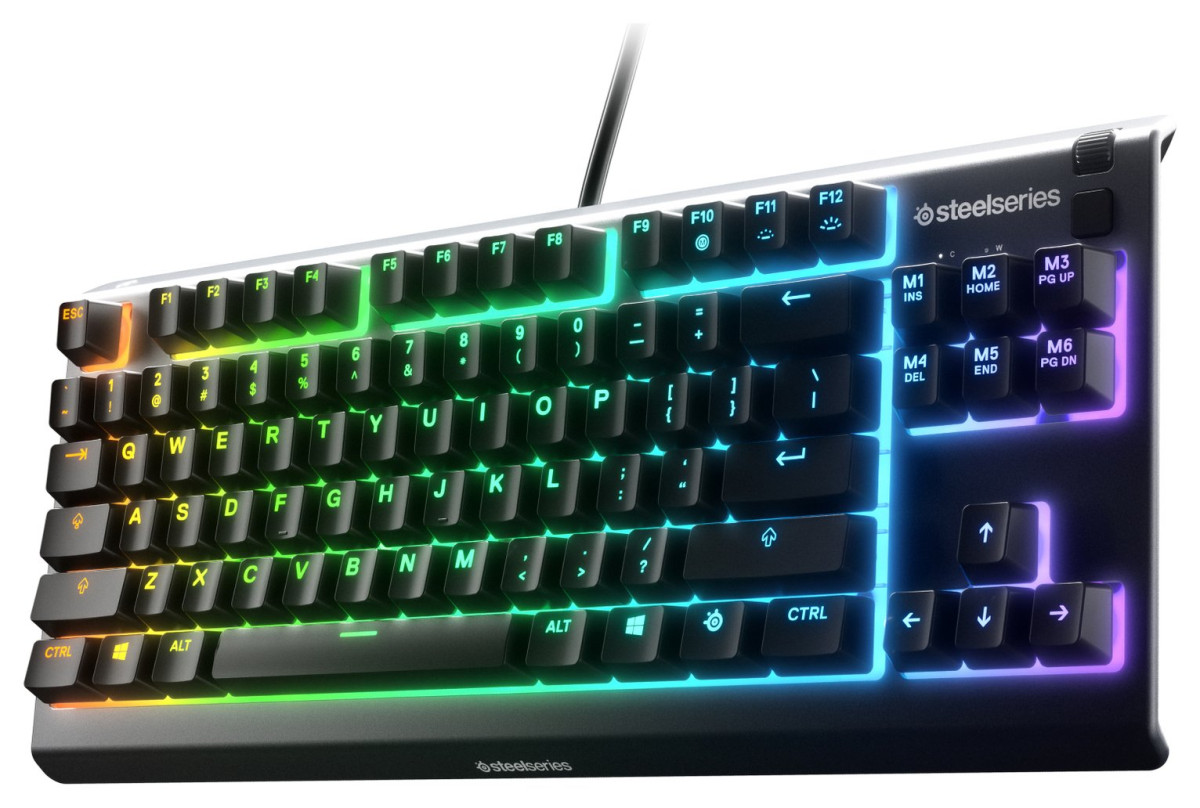
SteelSeries Apex 3 TKL
Steelseries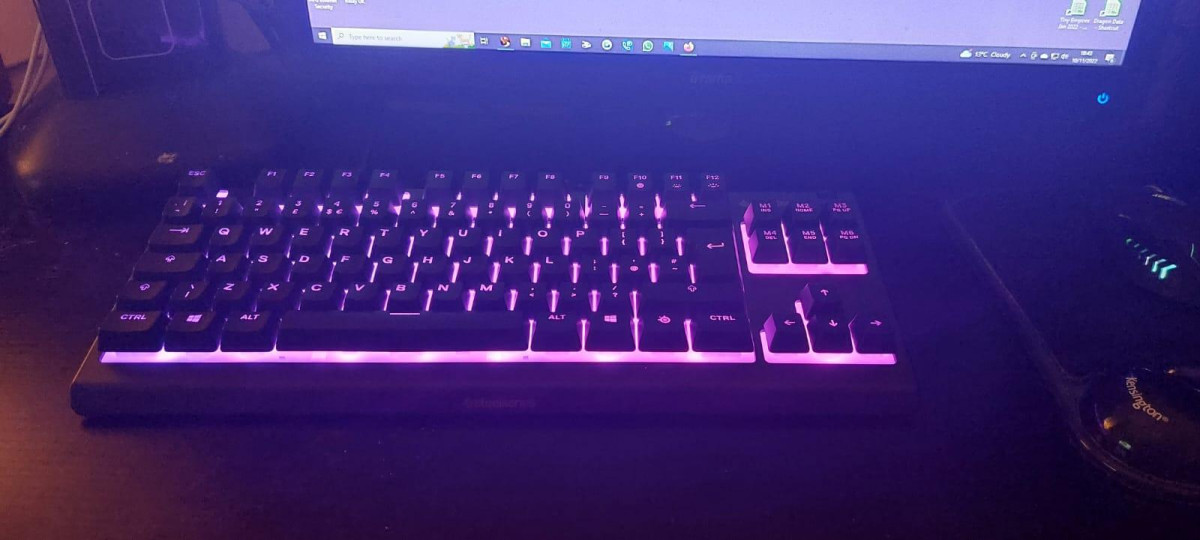
A Tenkeyless Layout Built for the Way Esports Players Actually Set Up Their Desks
Walk into any competitive gaming setup and you'll notice something missing: the numpad. That's not an oversight — it's a deliberate choice serious players make, and the SteelSeries Apex 3 TKL is built entirely around that philosophy. By chopping off the ten-key cluster on the right side, this keyboard hands you several extra inches of desk real estate exactly where your mouse hand needs it most. If you've ever felt your mouse mat cramped against a keyboard, forcing you to clip your movements mid-swing during a flick shot, this is the layout that solves it.
The board itself measures roughly 17.5 inches wide, just under 6 inches deep, and sits about 1.6 inches tall at its highest point, weighing in at a touch over 1.8 pounds. That's a compact, light footprint that won't dominate a desk, but it's substantial enough that it doesn't skate around during frantic gaming sessions. SteelSeries also built in three separate cable-routing channels along the frame, letting you direct the cord left, right, or straight back depending on how your setup is arranged — a small touch, but one that keeps cable clutter from becoming a daily annoyance.
What Whisper-Quiet Switches Actually Feel Like
This is the detail that defines the entire keyboard, so it's worth being precise about it: the Apex 3 TKL does not use mechanical switches. It uses rubber dome (membrane) switches that SteelSeries brands as "Whisper-Quiet," engineered with low-friction internals designed to survive roughly 20 million presses per key before wearing out.
In practical terms, that switch choice changes the entire personality of the keyboard. Traditional mechanical keyboards — especially ones with clicky switches — produce a sharp, percussive sound with every keystroke. Independent testing has found this board generates noticeably less noise than a typical mechanical board, closer to a quiet hush than a clatter. If you share a room with a partner on a night shift, live in a thin-walled apartment, or game late while someone else sleeps down the hall, that's a genuinely meaningful difference, not just a marketing line.
The trade-off is feel. Rubber dome switches have a softer, mushier bottom-out compared to the crisp, defined actuation point of a mechanical switch. Reviewers who've spent real time on it describe the keys as almost cushioned — pleasant for extended typing sessions and easier on the hands over long periods, but lacking the tactile "click" that competitive typists and mechanical-keyboard purists specifically seek out. It's also worth knowing going in that the legend layout on a couple of keys — most notably the number row — differs slightly from the standard arrangement you'd expect on a typical keyboard, which can trip up touch-typists for the first day or two.
The board also supports full key rollover, meaning it can register every key you press simultaneously without dropping inputs — a baseline requirement for anything marketed at gamers, since fighting games and fast FPS titles routinely demand multiple keys held down at once.
Lighting, Macros, and the Software That Runs Them
RGB Lighting
The Apex 3 TKL splits its backlighting into eight independently controllable zones, each capable of displaying any of 16.8 million colors. That's enough granularity to run a wave effect across the board, sync a specific zone to in-game health or ammo status, or simply match the lighting to the rest of an RGB-themed setup. Because SteelSeries uses the same lighting engine across its product line, the lighting on this keyboard can also be synchronized with other SteelSeries peripherals you might own, so your mouse, headset, and keyboard glow in coordinated patterns rather than fighting each other.
Programmable Keys and Macros
Beyond lighting, the keyboard offers a handful of programmable keys that can be mapped to macros — sequences of commands fired from a single keypress — or set up as quick-launch shortcuts for frequently used programs. For anyone who repeatedly executes the same multi-step combo in a game, or just wants a one-touch way to open a Discord call or streaming software, this turns a static key into a personalized shortcut.
The Software Layer
All of this customization runs through SteelSeries GG, the company's free software suite, and specifically its Engine component for lighting and macro configuration. The suite also bundles Moments, a clip-and-share tool that automatically captures gaming highlights for posting to platforms like Discord or YouTube. It's worth noting the software isn't something you'll stumble into automatically — you'll need to download it separately from SteelSeries directly, since the keyboard doesn't walk you through that step out of the box. Once installed, though, most users find the interface straightforward, even without prior experience configuring gaming peripherals.
There's also a set of dedicated media controls tucked into the top-right corner: a notched volume wheel for quick audio adjustment, plus a small multi-function button that handles play/pause, track skip, and previous-track functions depending on how many times you tap it. It's a genuinely useful inclusion at this price point, where dedicated media keys are often the first thing cut to save costs.
Built to Survive Spills, Dust, and Everyday Chaos
Every gamer who's ever knocked over a drink mid-match knows the panic that follows. The Apex 3 TKL carries an IP32 rating for dust and water resistance, meaning it's constructed to tolerate light splashes and dripping liquid without immediately frying the internals — a genuinely rare feature to find on a keyboard in this price bracket, let alone one this affordable. Combined with the 20-million-keypress switch rating, the overall build target is clearly longevity through abuse rather than premium materials for their own sake. This won't survive a full glass of water dumped directly onto it, but it's engineered specifically for the kind of everyday accident — a nudged mug, a spilled soda — that would otherwise mean replacing the whole board.
Backing that up, the keyboard carries a two-year manufacturer's guarantee, which is a solid commitment for a peripheral at this price and gives some reassurance that SteelSeries stands behind the durability claims rather than just printing them on the box.
Plug-and-Play Compatibility Across Platforms
Connectivity is about as simple as it gets: this is a wired USB keyboard, meaning there's no pairing process, no batteries to charge, and effectively zero input lag from wireless signal handling. Plug it into a free USB-A port and it's immediately recognized.
Where it gets genuinely useful is platform support. This isn't a PC-only peripheral:
| Platform | Compatible? |
|---|---|
| Windows PC | Yes |
| Mac (macOS) | Yes |
| Chromebook (ChromeOS) | Yes |
| PlayStation 5 | Yes (plugs in directly) |
| PlayStation 4 | Yes |
| PlayStation 3 | Yes |
| Xbox Series consoles | Yes |
| Xbox One | Yes |
| Xbox 360 | Yes |
| Nintendo Switch | No |
That breadth of support means one keyboard can realistically move between a PC gaming rig and a console living-room setup without any compatibility headaches, provided the device you're connecting to has a standard USB-A input. Tablets and USB-C-only devices will need a USB-C to USB-A adapter to work, since the keyboard itself doesn't include one.
Who Should Buy the Apex 3 TKL (and Who Shouldn't)
This keyboard makes the most sense for a specific, fairly large group of buyers:
- Console gamers who want a proper typing and chat experience on PS4/PS5 or Xbox without spending mechanical-keyboard money
- Anyone in a noise-sensitive environment — shared bedrooms, thin apartment walls, late-night sessions — who values quiet operation over tactile click
- First-time PC gamers building their first setup on a tight budget who want RGB lighting and console-adjacent build quality without committing to premium switches
- Parents buying for a younger gamer, where the quieter operation and spill resistance both work in the buyer's favor
- Anyone who wants a compact, desk-friendly layout to maximize mouse swing room for FPS or MOBA titles
It's a poor fit for a different set of buyers, and being upfront about that matters:
- Mechanical keyboard enthusiasts who specifically want a tactile bump or audible click feedback with every keystroke — the rubber dome switches simply aren't built to deliver that
- Competitive players chasing every millisecond of actuation speed, since rubber dome switches generally have a longer, less consistent actuation distance than mechanical switches tuned for speed
- Anyone who relies heavily on a numpad for spreadsheet work, accounting, or numpad-bound game bindings, since the TKL layout removes it entirely
- Nintendo Switch owners looking for a single keyboard to cover every console they own
How It Stacks Up Against the Competition
The most relevant comparison in this price bracket isn't another SteelSeries board — it's the current wave of budget mechanical TKL keyboards, particularly the Logitech G413 TKL SE, which has become a popular pick for buyers wanting genuine mechanical switches without spending much more than they would here.
| SteelSeries Apex 3 TKL | Typical Budget Mechanical TKL (e.g. Logitech G413 TKL SE) | |
|---|---|---|
| Switch type | Rubber dome (membrane) | Genuine tactile mechanical |
| Noise level | Very quiet | Noticeably louder, audible click/bump |
| Water/dust resistance | IP32 rated | Rarely rated |
| RGB lighting | 8-zone, 16.8M colors | Often single-color backlighting |
| Console compatibility | PS3/4, Xbox 360/One, wide support | Typically PC/Mac-focused |
| Typing feel | Soft, cushioned | Crisp, tactile feedback |
| Price positioning | Budget/entry-level | Similar or slightly higher |
The honest takeaway from that comparison: if tactile feedback and that "true mechanical" feel are non-negotiable, a board like the G413 TKL SE will satisfy that itch better. But if quiet operation, spill resistance, RGB customization, and broad console compatibility matter more to you than switch pedigree, the Apex 3 TKL is arguably the more complete package for a similar spend — it's simply optimizing for a different set of priorities than most mechanical alternatives in this range.
Where It Falls Short
No product this affordable is without compromise, and the honest weak points here are worth naming plainly. The rubber dome switches, while genuinely pleasant for casual typing, will feel imprecise to anyone who's spent real time on a quality mechanical board — there's a mushiness at the bottom of each keystroke that mechanical switches simply don't have. The absence of a wrist rest means longer sessions can get uncomfortable for people prone to wrist strain, something competitors occasionally include even at similar price points. And the software, while functional, isn't discoverable out of the box — you have to know to go looking for it, which isn't ideal for a buyer who just wants lighting control without hunting through a support site first.
On the other side of the ledger, the strengths are just as real. The IP32 rating and reinforced switch durability genuinely differentiate this board from same-priced rivals that make no such claims. The quiet operation solves a real, common problem rather than being a marketing checkbox. And the breadth of platform support — spanning three console generations across two manufacturers plus PC, Mac, and Chromebook — is unusually generous for a keyboard at this price.
The Verdict: Should You Buy It
The SteelSeries Apex 3 TKL earns its place as a genuinely strong entry-level pick, but only for the right buyer. If you're prioritizing quiet, comfortable typing, spill protection, and flexibility to move between a PC and a console without buying multiple peripherals, this is a smart, low-risk purchase that punches well above its price point. If instead you're chasing the tactile precision of a true mechanical switch, or you need a numpad for work or gaming, look elsewhere in the lineup — this specific model was never designed with you in mind. For everyone else — first-time builders, console gamers upgrading from a stock controller-only setup, or anyone tired of loud mechanical clatter — the Apex 3 TKL is an easy, confident recommendation.
What People Say
25 commentsGreat gaming keyboard - but a bit specialised.
I purchased this because I needed a backlit keyboard with macro capability for a Windows PC. It's good, no doubt about that, but to be able to make preference based changes to the default LED lighting pattern (it sweeps from one side to the other changing colours as it goes) the necessary software has to be installed to a Windows 10 or later operating system on a PC. The support software does not load to pre-Windows 10 but doesn't tell you so until after the attempted install process, however as most people are now using W10+ that is probably not a problem, but if you use W7 or earlier you will not get the best out of the keyboard's potential functionality. I found that it will, nonetheless, operate as a Plug 'n Play device, without additional software. The keys feel sure-footed and it is pleasing to use, but remember this is primarily a gaming keyboard and note there is no number pad. The macro and other instructions are not as clear as I would have expected so it took a bit of trial and error to get it to work for me, but that is merely a personal observation rather than a criticism. I found it to be a fun keyboard, robust, and pleasant to use, once I had it fully set up. In fairness tho' this is probably a younger person's ideal gaming keyboard rather than for a pensioner like me who happens to like macros and LED-lit keys.
Excellent Purchase!
Excellent keyboard! I have been looking for a keyboard with back lights for a while but they all seemed so expensive, this one is doing a great job, makes it easier to type and I like the fact that its more compact so fits my desk much better that my previous keyboard that had the additional side number pad. Also the keys are more raised then a normal keyboard so I find it easier to type. I should also mention the pretty colours it cycles though too :-) Great product no issues with it at all after using it for over four weeks so can happily reccomment.
good quality & worth the price
i bought this a week ago and have had absolutely no issues. it’s great quality and totally worth the price. the keyboard links to an app you download on your pc and within that you are able to design the colours you want displayed on the keyboard, allowing you to have the freedom to design it just how you want it! the keys are also relatively quiet and not at all clunky, making it great for gaming (so when you rage it doesn’t sound like you’re body slamming the keyboard).
Great value keyboard for gaming and video editing
great feel on the keys without them being too loud, the software that comes with the keyboard allows for full customization of the rbg back lights which is a nice feature. Ive been using it non stop the past few weeks since purchasing it and it has been a pleasure. its a shorter profile keyboard which frees up more desk space which is always a bonus. The build quality is top notch and feels very sturdy
Brilliant Peripheral
Amazing product! It's ergonomic, has amazing customization features and is quite quiet. Its a great piece of kit if you're accident prone. The built in macro editor is easy to use, and the built in volume control makes life much easier to adjust on the fly.
TLDR; It's quiet, sleek, brilliant for small set-ups and waterproof
Lovely keyboard
This is a really nice keyboard. I like that it is quite chunky yet petite in length. Quite pricey but I love the light up keyboard. I was a bit disappointed it wasn’t completely rainbow colours at all times. Instead it goes in a cycle.
Great value for money RGB gaming keyboard
Brought for our son’s first gaming PC. Really looks the part and a good feel to the keys. RGB lights are really effective and the keyboard is nice and compact. Really happy with this purchase for the money and our son loves it.
Good gaming keyboard for the price
I've had this for a month, and I don't regret buying it. I was slightly disappointed that it doesn't fully integrate with the manufacturer led software, but that's a small complaint, overall it's good quality
Great for the price point
Bought this a few weeks ago and I can say it's great for membrane. My mechanical stopped working and in a pinch this has served me well. Great feel and very responsive for membrane. Great value for money.
Great keyboard if you like membrane
This keyboard is my first official branded keyboard
Highly recommend if you like steel series
You can change the colours of the keyboard up to 8 different parts of the keyboard can be changed.
Great functionality
I bought this roughly a month or so ago and using it has been great both I and my cat enjoy using it both for different reasons but it's a great product all around good quality and great features
Fantastic
Bought this for my 11 year old son , he’s been though so many keyboards 60% ones ext but never had mechanical one, tried this one faab quality and really quiet , he loves it would deffo recommend
Nice LED and typing gaming keyboard
I bought this for my ps5 gaming. It is my first time buying a gaming keyboard with all features in one. The LED colour feature enhances my gaming enjoyment. The typing keyboard is quite nice.
Smart Little Keyboard
Brought for my PC gaming setup and love how it’s compact and fantastic quality! Perfect for what I use it for and the the colour lighting underneath is a great touch! Excellent purchase
Great
Feels nice under the fingers and well made, RGB lights look pro but have to download a massive one gig software "engine" just for lighting customising, bit of a pain if not a gamer.
Really convenient keyboard
I bought it a few weeks ago, I love how silent it is and how the keyboard feels. Apart from the fact that it doesnt have color schemes this keyboard is really good for its price.
Very good gsmibg keyboard
Brought this for my 9 year old sons birthday for his first pc gaming set up. Perfect for a young gamer, enexpensive but still feels quality and has bright rgb lights.
My son loves it
Not what I'd have gone for, but hey, what do I know! My son plays games. He chose this keyboard and he seems to love it. Moral of story....stick to the list!
Good gaming keyboard
I bought it to replace a standard keyboard and it is being working good since. Nicely built and it has got all the essential features. Happy with the buying.
Keyboard
Brought this a couple months ago, has improved the way I can play on my PC and it’s very durable. I would recommend this to anyone who plays PC games.