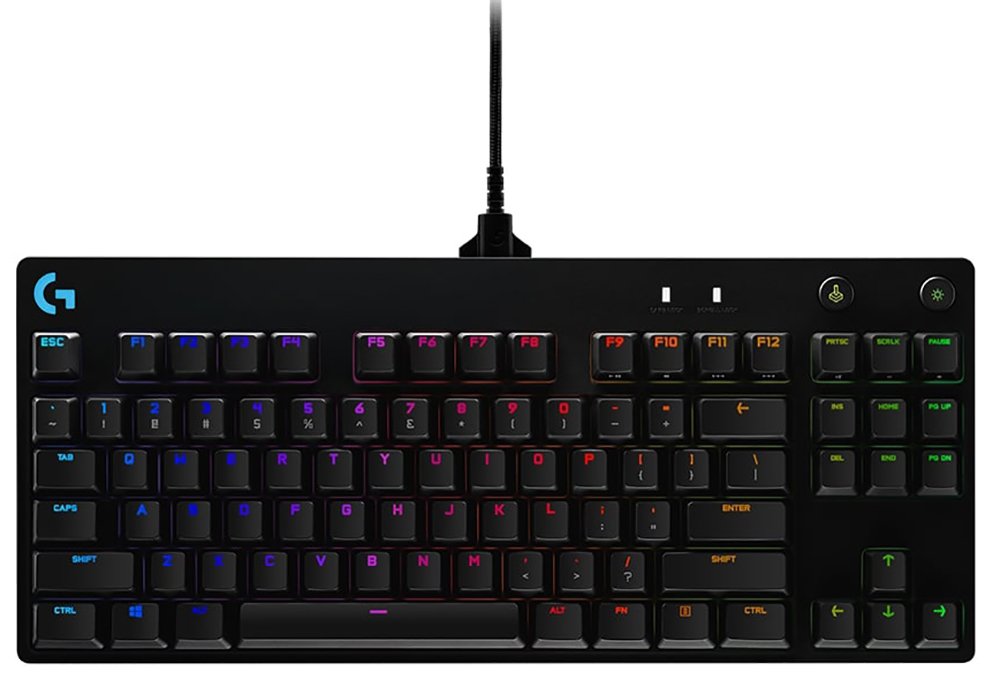
Logitech G Pro
Logitech
Why Competitive Gamers Keep Choosing a Keyboard Without a Number Pad
Walk into any esports arena and you'll notice something odd: almost nobody is using a full-size keyboard. The tenkeyless (TKL) layout — a full keyboard with the number pad chopped off — has become the default choice for serious PC gamers, and the Logitech G Pro is one of the originals that helped make that happen. Built specifically around what competitive players actually need at the keyboard, and stripped of what they don't, this keyboard has spent years earning a reputation as one of the more dependable tools you can put under your fingers during a ranked match or a LAN tournament. The question that matters is whether that reputation still holds up, and who this keyboard is actually right for. Here's the honest answer.
Design and Build: Small Footprint, Serious Heft
The first thing you notice when you pick this keyboard up is that it feels heavier than its compact size suggests. Logitech has packed a genuinely dense, well-braced chassis into a footprint that's noticeably smaller than a standard keyboard, and that weight works in your favor — it plants itself on a desk and stays there through frantic key mashing rather than sliding around mid-match. The tradeoff for that solidity is portability that's good but not featherlight; this isn't the keyboard you casually toss in a backpack without a thought, though it's still far easier to transport than any full-size board.
Losing the number pad isn't a downside for gaming — it's the entire point. That freed-up desk space means your mouse hand gets a longer, more natural swing distance, which matters enormously for low-sensitivity players who rely on big physical mouse movements for precise aim. If you spend your days doing accounting or data entry, you'll miss the numpad. If you spend your evenings in ranked matches, you won't think about it once.
The keyboard sits on flip-out feet with multiple tilt positions, so you can adjust the typing angle to whatever feels most natural, and rubberized grips on the base keep it from creeping during aggressive use. The cable is detachable and braided, which matters more than it sounds — a keyboard cable that permanently frays or fails usually kills the whole product, and a swappable cable means a worn-out lead doesn't have to be a death sentence for an otherwise healthy keyboard. That said, a small number of owners have reported the cable connection working itself loose if the keyboard gets shifted around a lot on the desk, so if you're the type who repositions your setup frequently, it's worth seating that connector firmly.
The Switches: What GX Blue Clicky Actually Feels Like
This is a mechanical keyboard, and specifically one built around Logitech's own GX Blue Clicky switches, manufactured with Kailh. If you've never used a clicky mechanical switch before, here's the plain-language version: every keystroke has a small bump you feel partway through the press, paired with an audible click, so you get both physical and auditory confirmation that a keypress has registered. That's different from a membrane keyboard (the soft, mushy kind found on most budget laptops and office boards) or a linear mechanical switch, which presses straight down with no bump and a quieter sound.
For gaming, that tactile feedback is a genuine advantage. You can feel exactly where the actuation point is, which helps you develop a consistent, confident touch rather than guessing whether a press landed. For typing, most users find the switches comfortable for long sessions, though the sound is a real consideration — this is not a quiet keyboard. Multiple owners specifically flag the noise level as something to think about if you're sharing a room, working from a shared office, or gaming late at night next to a sleeping partner.
One long-term reviewer put it bluntly: it's satisfying to use at your own desk and genuinely irritating to sit near if you're not the one typing.
The switches are also built for longevity — they're rated to survive tens of millions of keypresses, well beyond what a casual user would ever put a keyboard through, even over years of daily use. That durability rating matters if you're someone who bottoms out every key hard during intense moments, since some players hammer keys far harder than a manufacturer's "typical use" testing assumes.
One limitation worth flagging clearly: the switches in this specific model are soldered to the board. You cannot swap them out for a different switch type later. If hot-swappable switches — the ability to physically pull a switch and replace it with a different feel — matter to you, Logitech sells a separate "X" variant of this same keyboard specifically for that purpose, at a higher price. This standard version is the fixed-switch model, and that's a deliberate simplicity, not an oversight.
Core Performance: Speed and Precision Where It Counts
Underneath the switches, this keyboard is engineered around the two things that actually decide whether a keyboard is "gaming-grade" versus just decorative: how quickly it registers your input, and how reliably it handles multiple simultaneous keypresses.
On response speed, the wired USB connection and the switch design combine to deliver the kind of low, consistent input lag that competitive titles reward. In practice, this means the time between your finger moving and the game receiving that input is short enough that you won't be blaming your keyboard for a missed dodge or a late reload.
On simultaneous input handling, the keyboard includes extensive anti-ghosting — the technical term for a keyboard correctly registering multiple keys pressed at once, rather than "ghosting" (missing inputs) or misreading combinations. If you've ever mashed several movement and ability keys together in a fast-paced game and had one just... not register, that's a keyboard failing at anti-ghosting. This board is built to avoid exactly that scenario across the key combinations gamers actually use — movement clusters, ability rotations, and modifier-key combos.
One practical note on compatibility: the keyboard is officially supported on Windows and macOS. Console gamers frequently report that it works as a basic plug-and-play input device on modern consoles through USB, since keyboards are widely treated as standard input hardware — but Logitech doesn't officially list console support, and features like macro programming, per-key lighting customization, and profile switching depend on the companion software, which only runs on a PC or Mac. If you want the full programmable experience, you'll need to set it up on a computer first, even if you ultimately use the keyboard elsewhere. It's also worth being cautious if you're hoping to use it with a Chromebook — there's no confirmed compatibility with ChromeOS, so treat that pairing as a gamble rather than a guarantee.
Programmability and Lighting: What the Software Actually Adds
This is where the "Pro" branding earns its keep. Through Logitech's G HUB software, you can assign custom actions to the function key row — F1 through F12 — turning them into programmable macro keys capable of firing off multi-step, precisely timed sequences with a single press. Think of a macro as a recorded set of actions: instead of manually typing out a complex chat command or executing a multi-key ability combo every time, you record it once and trigger the whole sequence with one keystroke.
Beyond the function row, the keyboard offers additional dedicated hotkey slots — a full dozen programmable shortcuts in total — that you can assign to launch favorite programs, trigger in-game actions, or fire macros, giving you quick access to whatever you use most without alt-tabbing or hunting through menus mid-match. There's also a dedicated Game Mode toggle, which temporarily disables keys like Windows and Menu that could otherwise pull you out of a game accidentally during an intense session — a small feature, but one that solves a genuinely annoying real-world problem for anyone who's been yanked out of a match by an accidental Windows key tap.
On the visual side, every key features full RGB backlighting with a wide color range, controllable per-key through the same software, and the keyboard can retain your lighting configuration in onboard memory, so your custom setup persists even without the software actively running in the background. Some reviewers also note the lighting can be configured to react to sound, adding a layer of ambient customization beyond static colors. If flashy desk aesthetics matter to you as much as function, this delivers convincingly; if you couldn't care less about RGB, it's easy enough to just switch off.
Battery, Power, and Everyday Reliability
Because this is a wired keyboard, there's no battery to manage, no charging cable to remember, and no risk of it dying mid-tournament — power comes straight from the USB connection whenever it's plugged in. For competitive players, that's not a compromise; wired connections eliminate the tiny amount of latency and the connection-dropout risk that even good wireless keyboards can't fully escape. The tradeoff is the obvious one: you're tethered to your PC, and if a clean, cable-free desk is a priority for you, you'll want to look elsewhere in Logitech's own lineup, where wireless versions of this same family exist at a meaningfully higher price.
Who This Keyboard Is Actually For
This keyboard is a strong fit if:
- You play competitive, fast-paced games where input speed and reliable multi-key registration genuinely affect your results
- You want more desk space for wide, low-sensitivity mouse movements
- You value tactile, audible feedback on every keystroke and don't mind the noise that comes with it
- You want to program custom macros and quick-launch shortcuts for games or workflow tools
- You're setting up a simple, reliable wired peripheral and don't want to think about batteries or dropped wireless connections
- You want customizable RGB lighting without paying flagship prices for it
It's a poor fit if:
- You regularly do data entry, spreadsheet work, or anything else that leans on a number pad
- You're sensitive to keyboard noise, or you type/game in a shared space where clicky switches would bother others
- You want the option to swap physical switches later as your preferences change
- You need a fully cable-free desk and are prepared to pay more for Logitech's wireless equivalent
- You're shopping for a Chromebook or a platform outside Windows/macOS and need guaranteed software support
How It Stacks Up Against the Rest of Its Own Family
The most useful comparison for this keyboard isn't a rival brand — it's the other keyboards in Logitech's own Pro lineup, since they share a design philosophy and price tier.
| Feature | This Keyboard (G Pro, GX Blue) | G Pro X (Hot-Swap Variant) | G Pro X TKL Wireless |
|---|---|---|---|
| Switch type | Fixed, clicky (GX Blue) | User-swappable (multiple options) | Fixed or swappable, tri-mode wireless |
| Connectivity | Wired USB only | Wired USB only | Wired, Bluetooth, and 2.4GHz wireless |
| Customization | Software macros and lighting | Software macros, lighting, plus physical switch swaps | Software macros, lighting, plus switch swaps |
| Typical price position | Entry point of the Pro lineup | Mid-tier premium over the base model | Highest in the family |
| Best for | Straightforward, reliable, wired esports setup | Players who want to fine-tune switch feel over time | Players who want wireless freedom and top-tier flexibility |
If your priority is simplicity, reliability, and a proven feel at the most accessible price point in this particular lineup, the standard wired model reviewed here is the sensible starting point. If switch customization is a feature you know you'll actually use, or if a cable-free desk is worth paying extra for, Logitech's own upgrades exist specifically to solve those problems — you don't have to look at a different brand to get them.
Against the broader gaming keyboard market outside Logitech's own catalog, this keyboard's core appeal is its balance: a genuinely tournament-proven feel, straightforward wired reliability, and deep macro programmability, at a price point that sits below many premium hot-swappable boards while still delivering full mechanical switch performance and complete RGB customization.
The Honest Strengths and Weaknesses
The strongest case for this keyboard is consistency. It does a small number of things — fast, reliable input; comfortable, tactile mechanical feel; solid macro programmability — and does all of them well, without adding bloat or unnecessary features you'll never touch. The build quality holds up to genuinely aggressive use, the software is capable without being overwhelming, and the compact layout solves a real problem for anyone who's ever wished their mouse had more room to roam.
The honest downsides are just as clear. The noise is not subtle, and if you're keyboard-shopping for a shared space, that alone might be a dealbreaker regardless of how good the typing feel is. The fixed switches mean you're committing to clicky tactile feedback permanently — there's no changing your mind in six months without buying new hardware. And while the wired connection is a performance positive for competitive play, it's a lifestyle negative if a clean, cable-free desk matters to you.
None of these are flaws in execution — they're the natural tradeoffs of a keyboard built with clear priorities. The question isn't whether this keyboard does its job well; it's whether its specific set of choices matches what you actually need from a keyboard.
The Final Verdict
If you're a competitive or semi-competitive PC gamer who wants a tenkeyless mechanical keyboard with genuinely tactile clicky switches, dependable wired performance, and real macro programmability, this keyboard delivers exactly what it promises without unnecessary extras inflating the price. It's an easy recommendation for anyone building a serious gaming setup who doesn't need switch-swapping flexibility or wireless freedom badly enough to pay a premium for it.
Skip it if you need quiet operation for a shared space, if a number pad is non-negotiable for your daily work, or if you already know you want the flexibility to change switch types down the line — in those cases, look either outside this lineup entirely or toward Logitech's own upgraded variants built specifically to solve those problems.
What People Say
11 commentsExcellent gaming/developer keyboard
Excellent keyboard, solid construction with real quality and weight to it
Keyboard has clicky mech keys, great for gaming. A further two sets of keys can be bought so these can be changed completely or replaced individually as they wear out
Wasn’t bothered about lighting but actually comes in handy as it has several presets for common games, I have found it more useful setting up other presets for blender and unreal engine
Only gripe is that there is no USB pass through
Well worth the money
An excellent gaming keyboard
I bought this keyboard as a replacement for my old Razer Tartarus V2. It's clicky, responsive and feels great to type with and amazing to game with. It matches perfectly with my Logitech G502 and my Logitech GPRO headset. There is quite a bit of customisation on the GHUB software. If you are a gamer, this is a great keyboard. The only downside is that some people may find the clickiness to be annoying; it is a loud keyboard.
Went from being my gaming keyboard to my only one!
Excellently built keyboard. Buttons sound nice. RGB is nice but it doesn’t always remember your settings so I often have to open up the G Hub for it to recognise my favourite profile.
I use it with my PS5 and PC and it works perfectly between the two
Losing the right number pads takes some getting used to but all in all I’ve managed to transition away from my Logitech MX Keys in favour of this.
Such a nice keyboard
Bought this to replace a Cherry MX Red keyboard I had. This keyboard is so much nicer to use, and certainly over the span of a day working from home!
The keys on the board are very clicky, but not too loud. They feel great, and for gaming they really help to feel when you have pressed the key fully.
I would happily recommend this to anyone who games and works from home :)
Amazing keyboard
I bought this a while ago and it's amazing for typing and gaming. Also if you're in to RGB lighting it has it also. It's not a full size keyboard so it's missing the numpad on the right of the keyboard but if you have limited desk this is the one for you.
Perfect addition to any work from home setup
Easy to use, able to turn lighting off and adjust color without as software, keys aren't to heavy to type on with a satisfying click on actuation.
My AVG WPM went from 72 to 84 since moving to this keyboard.
Also great for gaming
Excellent everything i wanted and mechanical switc
Product is amazing I love it to bit going from membrane to mechanical feels so more responsive and faster for those FPS shooters
Looks fab when on
My son picked this one as he is quite the gamer he says it a good keyboard and worth the money so he is happy
Amazing keyboard for gaming and typing
I have had a few keyboards steelseries razer corsair ducky one and this is by far the best one of them all
great keyboard for the price.
i do a lot of programming and found this keyboard very easy to use and love the key glow colour options.
My keyboard is perfect portable size.
The price is perfect for a compact keyboard and the design and ease of setup is perfect for portable use