Logitech MX Keys Mini
Logitech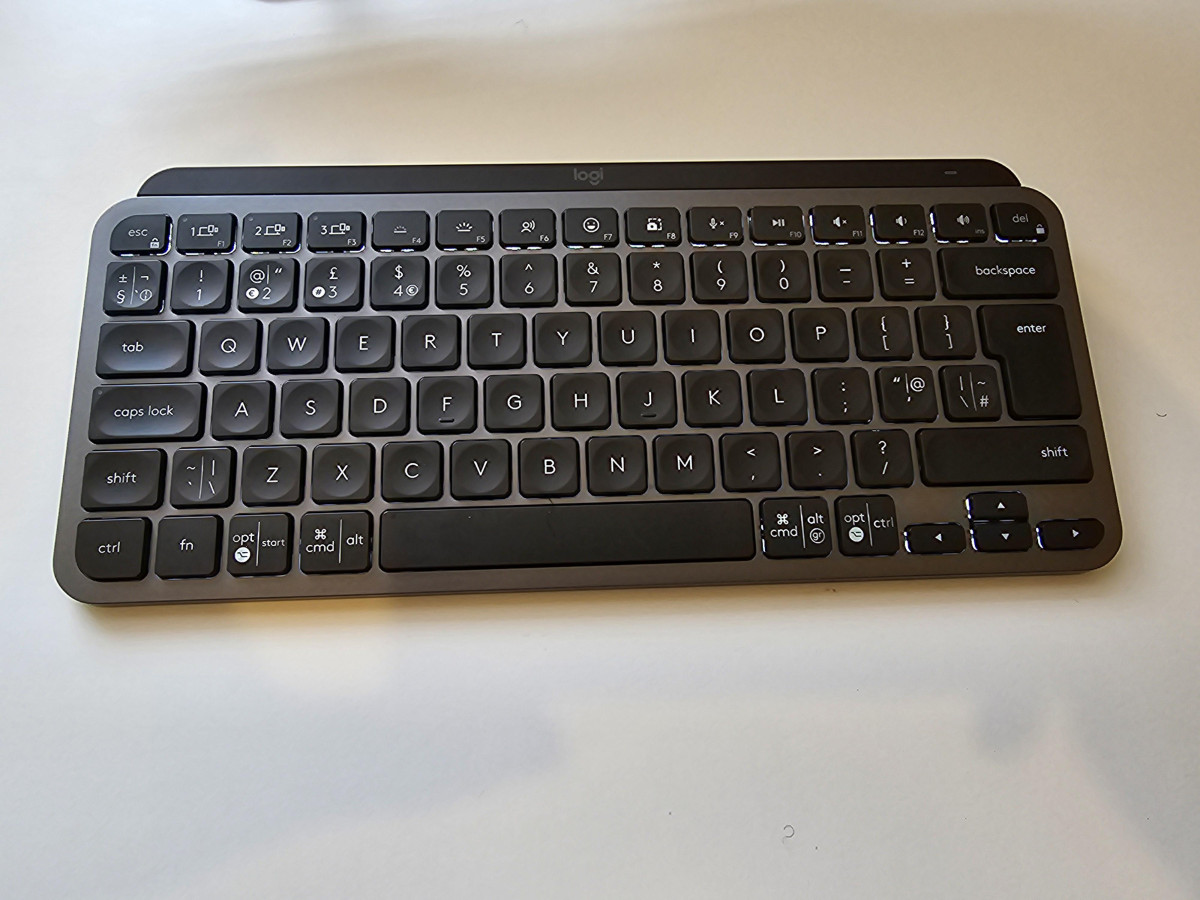
First Impressions: The Case for Going Smaller
Not every keyboard needs a numpad. Not every desk needs to be dominated by ninety-plus keys you'll touch twice a year. The Logitech MX Keys Mini in Graphite is built entirely around that idea: strip away what most people never use, and put real engineering effort into the keys you touch thousands of times a day.
This isn't a stripped-down or cut-rate version of Logitech's full-size MX Keys — it's a purpose-built compact keyboard aimed at creators, hybrid Mac-and-Windows users, and anyone who wants their mouse sitting closer to their body instead of reaching past a numpad to get to it. The question this review answers is simple: is going smaller worth the trade-off, and does the asking price make sense once you understand what's actually inside?
Design, Build Quality, and Desk Presence
Size, Weight, and Materials
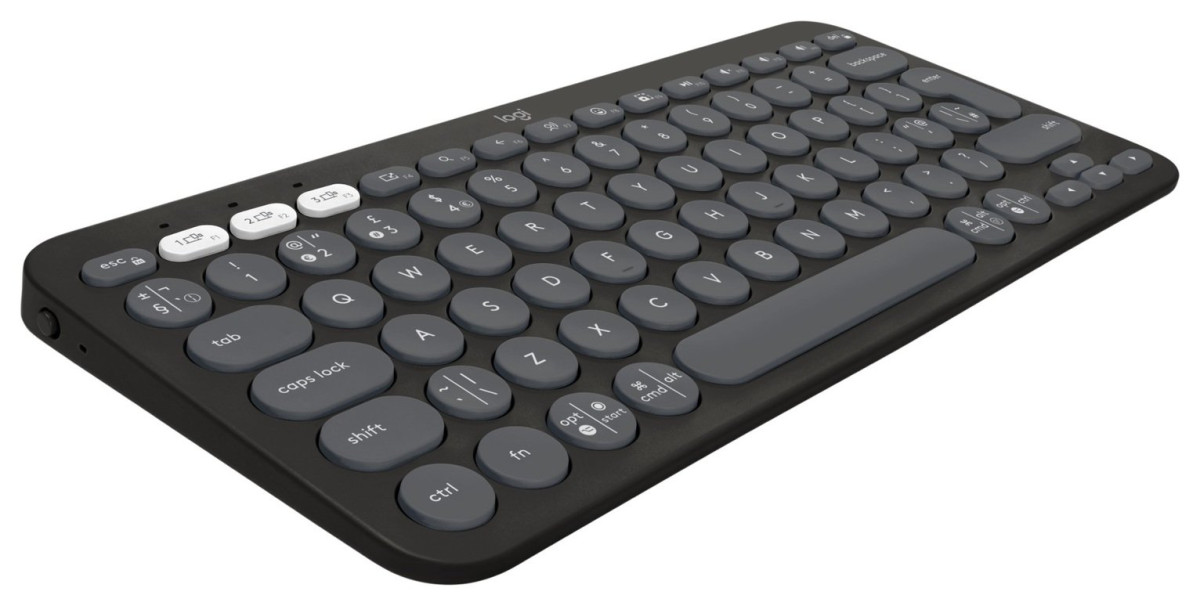
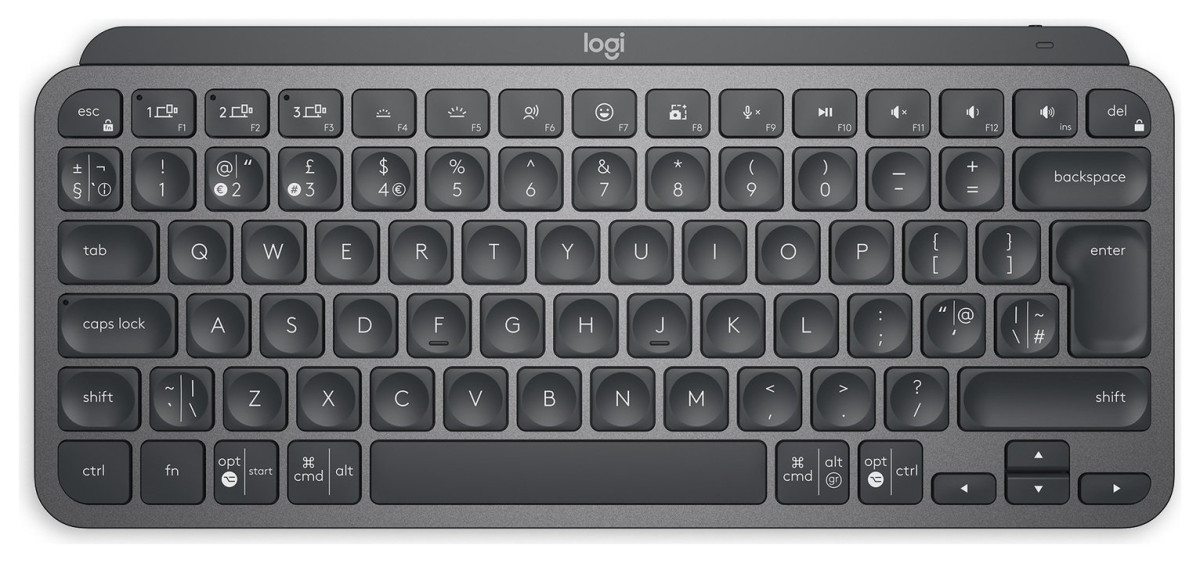
The MX Keys Mini measures roughly 296mm wide, 132mm deep, and just 21mm tall at its thickest point — about the footprint of a slim paperback laid on its side. That's small enough to tuck into most backpacks without a dedicated case, but it isn't a featherweight toy. At around half a kilogram, it has real heft in the hand, and that density is a deliberate design choice rather than an oversight. A single internal metal plate ties the whole chassis together, which is why the board resists flex and doesn't creak or bow when you type with any force, even one-handed while holding it up.
The chassis itself is made from a plastic blend that includes a meaningful proportion of recycled material, so the environmental credentials aren't just a marketing footnote. It shows up in the texture too — a slightly matte, fine-grained finish that resists fingerprints far better than glossy plastic and doesn't feel cheap under the palm.
The Graphite Finish and Colour Options
This particular listing is the Graphite colourway — a dark charcoal-grey body with matching dark keycaps and light grey legends. It's the more understated of Logitech's finish options (the line also comes in a lighter pale grey and a rose tone), and it reads as professional rather than flashy. If your desk setup leans toward dark peripherals, monitor arms, and minimalist styling, Graphite disappears into that aesthetic rather than fighting it. There's no RGB lighting show here, no aggressive angles — just a low, flat profile that looks like it belongs in an office rather than a gaming rig.
Typing Experience: What "Perfect Stroke" Really Means
Logitech's marketing calls these "Perfect Stroke" keys, which is meaningless on its own — so here's what it translates to in practice. Each keycap has a gentle concave dish, subtly curved to match the shape of a fingertip, rather than the flat top you'd find on a MacBook or Apple's Magic Keyboard. That curve does two things: it centres your finger on the key automatically, and it creates a very slight lip that helps you find home row by feel alone, without glancing down.
Underneath, the switches are scissor-mechanisms rather than full mechanical switches, with roughly 1.8mm of vertical travel. To put that in context: a proper mechanical keyboard typically offers 3.5–4mm of travel with an audible, springy click; a flat laptop-style chiclet key offers barely 1mm and can feel mushy or bottomed-out. The MX Keys Mini sits deliberately in between — enough travel to feel responsive and give tactile feedback with every keystroke, but shallow and quiet enough that you can type on a video call or in a shared office without drawing attention. It's a genuine middle ground, not a compromise that satisfies neither camp.
Longevity is built in too. The standard keys are rated to withstand roughly ten million keypresses before wear becomes a concern, with the function row rated slightly lower at around five million — both figures translate to years of continuous daily typing before you'd ever expect a key to feel inconsistent or need replacing.
Adaptive Backlighting: Smarter Than It Sounds
Every key is individually backlit, but the clever part isn't the lighting itself — it's the sensing behind it. Built-in proximity sensors detect your hands approaching the keyboard and trigger the backlight to switch on automatically, then fade it out again once you've been away for a few seconds. Layered on top is an ambient light sensor that continuously reads the room and adjusts brightness to match — dimming right down in a bright, sunlit room where backlighting would be pointless anyway, and boosting output in a dark room where you actually need to see the legends.
The practical upshot is that you never have to think about it. You don't hunt for a brightness key, and you don't accidentally leave the lights blazing overnight and drain the battery. It's the kind of feature that's easy to dismiss on a spec sheet and genuinely easy to appreciate once you've lived with it for a week.
The Three Keys That Change Your Daily Workflow
Along the top row, Logitech has swapped out three keys you'd never miss for three that are genuinely useful for modern hybrid work:
Dictation key
Press once and your operating system's built-in speech-to-text engine activates immediately, letting you talk instead of type for quick messages, notes, or drafts.
Mic mute/unmute key
A single dedicated button to silence or unsilence your microphone mid-call, without hunting through your conferencing app's toolbar while someone's waiting on you.
Emoji key
Opens your system's emoji picker instantly, useful for anyone who spends their day in Slack, Teams, or similar chat tools and wants to react without breaking flow.
None of these are revolutionary in isolation, but together they reflect who this keyboard was actually designed for: people on video calls, chat platforms, and dictation software all day, not people running spreadsheets in isolation.
Connectivity: Bluetooth, Multi-Device Switching, and the Dongle Question
The MX Keys Mini connects over Bluetooth Low Energy and can hold pairings with up to three separate devices simultaneously — a laptop, a desktop, and a tablet, for instance — switching between them with a single button press rather than re-pairing each time. There's no USB receiver required for this to work, which matters if your laptop is short on ports.
Cross-platform support is broad: Windows, macOS, ChromeOS, and Linux are all supported at a basic level out of the box, with iOS, iPadOS, and Android also covered. The bottom row of keys carries dual legends for both Windows and Mac modifier keys, so switching between a work laptop and a personal Mac doesn't mean relearning your muscle memory. For deeper customisation — remapping function keys, assigning app shortcuts, or setting up macros — Logitech's companion software unlocks programmable hotkeys and favourite-key assignments referenced in the packaging, though the keyboard's core typing and switching functions work perfectly well without ever installing anything.
Battery Life and Charging: The Real Numbers
The internal rechargeable battery is rated by Logitech to last around ten days of typical office use with backlighting active, or as long as five months if you switch the backlight off entirely. That's a wide range, and it reflects how much of the battery drain actually comes from lighting rather than the wireless connection itself — if you work mostly in daylight and don't rely on the glow, this keyboard can genuinely go the better part of a season between charges.
Charging happens over USB-C, which is a welcome update from older Logitech boards that still used micro-USB. There are two details worth flagging before you buy, though. First, no charging adaptor is included in the box — you get the USB-A to USB-C cable, but you'll need to supply your own wall plug or plug it into a computer's USB port to top up. Second, the keyboard is not designed for fast charging: it expects a modest 2 to 2.5 watts of input and does not support higher-wattage "PD" fast-charge protocols. In real terms, this means a quick top-up isn't dramatically quick — but given how rarely you'll need to plug in at all, that's a minor inconvenience rather than a genuine flaw. A basic USB charger, phone charger, or laptop port will do the job.
Who This Keyboard Is Built For (And Who Should Look Elsewhere)
This keyboard makes the most sense for:
- Creators and knowledge workers who spend most of the day in documents, browsers, and communication tools rather than spreadsheets with heavy numeric entry
- Anyone who regularly switches between a Mac and a Windows machine, or juggles a laptop alongside a tablet or phone
- People who travel with their keyboard or work from cafés, co-working spaces, or multiple desks
- Desk setups where reclaiming a few extra centimetres of surface — and moving the mouse closer to the body — genuinely improves posture and comfort
- Anyone on frequent video calls who'd benefit from one-touch mic muting and instant dictation
This keyboard is a poor match for:
- Anyone who relies on a numeric keypad daily — accountants, data-entry roles, or spreadsheet-heavy jobs will find the missing numpad a real productivity cost, not a minor styling choice
- Gamers or anyone wanting mechanical-switch feel, N-key rollover, or RGB customisation
- Buyers on a tight budget — this sits at the premium end of compact keyboards, and the price reflects build quality rather than raw feature count
- Anyone who needs a wired-only connection with zero setup — while it works over Bluetooth without any dongle, getting the most flexible experience across older hardware may mean an extra purchase
How It Compares to the Alternatives
| Feature | MX Keys Mini (this keyboard) | Logitech MX Keys (full-size) | Apple Magic Keyboard | Logitech MX Mechanical Mini |
|---|---|---|---|---|
| Layout | Compact, no numpad, retains F-row and arrows | Full-size with numpad | Compact, no numpad | Compact, no numpad |
| Switch type | Scissor, ~1.8mm travel | Scissor, ~1.8mm travel | Flat chiclet, shallow travel | Mechanical, deeper travel and audible click |
| Backlighting | Adaptive, proximity + ambient sensors | Adaptive, proximity + ambient sensors | None | Adaptive, proximity + ambient sensors |
| Multi-device switching | Up to 3 devices, one-touch | Up to 3 devices, one-touch | Single device only (standard model) | Up to 3 devices, one-touch |
| Dedicated dictation/emoji/mute keys | Yes | Yes | No | Yes |
| Best suited for | Space-conscious creators wanting quiet, cushioned typing | Users who still need a numpad | Simplicity-focused Apple-only users | Typists who want a louder, springier mechanical feel |
The full-size MX Keys is the obvious internal alternative if you decide, after living with the Mini, that you genuinely miss the numeric keypad — everything else about the typing feel and software carries over. Apple's Magic Keyboard remains lighter and cheaper but sacrifices backlighting, multi-device switching, and the productivity-focused extra keys entirely. The MX Mechanical Mini is worth a look if the scissor-switch feel here doesn't scratch the itch and you'd rather have a springier, more clicky mechanical action in the same compact footprint — though expect more noise as the trade-off.
Strengths and Weaknesses, Honestly
Strengths
The typing experience is the clear highlight here, and it's not close. The concave key shape combined with that 1.8mm of cushioned travel manages to feel satisfying without being loud, which is a genuinely difficult balance most compact keyboards don't strike. Build quality backs that up — the internal metal plate means there's no flex or hollow feeling under the hands, and the recycled-plastic shell holds up to daily handling without picking up scratches or fingerprint smudges easily. Battery life is a real strength too: the gap between "ten days with the lights on" and "five months with them off" gives you genuine flexibility depending on how you work, and the days of hunting for a proprietary charging cable are over thanks to USB-C.
Weaknesses
The weaknesses are worth being upfront about, though. Losing the numpad is a genuine cost for some workflows, not a purely cosmetic change — if you move numbers around for a living, factor that in before buying. The decision to ship without a charging adaptor or a USB receiver, while common practice across the industry now, still means unboxing this keyboard isn't quite as complete an experience as the price might suggest; budget for a spare USB charger if you don't already have a spare one lying around. And while the styling is clean and professional, it's also fairly conservative — nobody's desk setup gets more exciting for having this keyboard on it. It does its job quietly rather than making a visual statement.
The Verdict: Should You Buy the MX Keys Mini in Graphite?
If your daily work revolves around typing — documents, messaging, code, dictation, browser tabs — rather than heavy numeric entry, this is one of the most comfortable and best-built compact keyboards available at this size and price point. The typing feel alone justifies serious consideration, and the combination of genuine multi-device switching, adaptive backlighting that requires zero manual adjustment, and battery life measured in months rather than days makes it a keyboard you set up once and stop thinking about.
Buy it if you want a premium, quiet, comfortable typing experience that frees up desk space and moves seamlessly between a Mac and a PC. Skip it if you need a numpad for your daily work, want mechanical-switch feedback, or are shopping purely on price — in which case the standard MX Keys or a budget compact board will serve you better. For everyone else who spends their day typing rather than crunching numbers, the Graphite MX Keys Mini earns its place on the desk.
What People Say
35 commentsCompact, Stylish, and Exceptional Typing Experienc
Design & Build Quality
The keyboard’s minimalist design is sleek and elegant, especially in the Graphite finish, which adds a professional and modern touch to any setup. Despite its compact size, it feels robust and well-constructed, with no flex in the frame. The low-profile keys are perfectly spaced, ensuring a comfortable and efficient typing experience even in a smaller form factor.
Typing Experience
Typing on the MX Keys Mini is a delight. The keys are slightly indented to fit the natural shape of your fingertips, providing excellent tactile feedback. The scissor-switch mechanism offers a quiet yet responsive typing experience, ideal for both office work and late-night sessions. The backlit keys automatically adjust to the lighting in the room, which is both practical and a nice touch of luxury.
Wireless Performance
Connectivity is seamless with Bluetooth and Logitech’s Bolt receiver. Pairing the keyboard with multiple devices is effortless, and switching between them is instant using the Easy-Switch keys. Whether you're working on a laptop, tablet, or smartphone, the MX Keys Mini handles it flawlessly. It also works across platforms, supporting Windows, macOS, Linux, iOS, and Android.
Battery Life
The battery life is impressive. On a single charge, the keyboard lasts weeks, and the USB-C charging ensures that when it does need a recharge, it’s quick and convenient. The keyboard's energy-saving features, such as the auto-backlight adjustment, further extend its battery life.
Ergonomics
While it doesn’t have a wrist rest, the keyboard's low profile and comfortable key travel make it ergonomic for long typing sessions. Its compact size also reduces arm movement, which can be a plus for those working in tight spaces or on the go.
Additional Features
The dedicated emoji, microphone mute, and dictation keys are a handy addition for modern workflows.
The smart illumination not only adjusts to ambient light but also turns on as your hands approach the keyboard, adding a sense of sophistication.
Pros
Sleek and compact design.
Excellent typing feel with indented keys.
Seamless multi-device connectivity.
Long battery life with USB-C charging.
Adaptive backlighting.
Cons
No included wrist rest (though it may not be needed for most).
A bit pricey compared to basic keyboards, but the quality justifies it.
Final Verdict
The Logitech MX Keys Mini Wireless Keyboard is a premium device that blends style, functionality, and performance. It’s perfect for professionals, creatives, and anyone who values a clutter-free yet powerful workspace. Its compact design doesn’t compromise on features, making it one of the best wireless keyboards available. Highly recommended!
Horiffic, put me off the brand for life.
Picked this up from my local Argos. I noticed on picking it up that the box was tatty but decided to take it home. On further inspection, it had been open, used and put back onsale as new! It had dirt on it, no protective film and cables were just stuffed in box for full price.
Took it back and told them I was not paying that price for a used keyboard. They did get me a new unopened one.
On getting home, I tried to pair it with my Windows PC like every other Bluetooth keyboard I have but the thing literally connects and disconnects every few seconds. I could type anything on whout it missing letters or just typing random things.
Doing a little research online seems to suggest that you can buy some kind of dongle by Logitech to make it work, but why would I pay over 70 quid for a BT keyboard and then have to buy a dongle? That should be in the box if that's the case and a real BT keyboard should not need a dongle.
I will never go near the brand again. Complete shambles.
Possibly the best keyboard available!
If you own more than one computer and need to be able to switch between them, you'll already know what a pain it is to have multiple keyboards. The MX Keys provides the perfect solution to this - it lets you pair the keyboard with up to three different computers and switch between them with a single key press! This feature alone makes the MX Keys quite possibly the best keyboard on the market. But it doesn't stop there - it also happens to be a joy to type on and is also extremely well made. Whether you're a Mac or PC user, the MX Keys is a big step up from other keyboards - this thing even makes the Apple keyboards look positively underwhelming! I've owned a couple of these MX keyboards now (both the compact and full size models) and I wouldn't use anything else!
9/10
It's a great compact keyboard for the price I brought it for.(£80) I daily drive this keyboard between work and home, since it's small and slim, it makes it easy to carry it in the bag without any problems. My only problem is that I wish the battery life was better. ALSO BARE IN MIND THAT IT DOES NOT COME WITH A DONGLE, IT HAS BUILT IN BLUETOOTH, IF YOUR WORK LAPTOP/DESKTOP BLUETOOTH IS RESTRICTED THEN YOU NEED TO BUY A LOGI BOLT DONGLE SEPARATELY, ROUGHLY ANOTHER £10. Which I had to able to use it at work , a little bit annoying apart from that it's a quality product.
Fantastic keyboard + high quality product
Build quality is fantastic and was very simple to set up. Design is compact and small enough to be portable if need be. This keyboard is roughly the size of the keyboard on my 14" laptop. Typing on the leyboard feels great and I am personally a fan of the ergonomically shaped keys - I make far less mistakes typing on this. Being able to quickly switch between 3 devices is a very handy feature, as is the ability to remap most of the function keys. Definitely feels like a "premium" product, and that's exaclty what you get. Would highly recommend.
Great little keyboard.
So pleased I got this!
Easy to set up and will connect to 3 different devices. Simply switch between devices with a single touch of a button.
The keys are super smooth and have a slight indent that fits a fingertip perfectly.
The gentlest of touches makes typing a breeze.
The backlighting makes for good visibility and it senses when your hand approaches the keyboard and will light up. Move your hand away and the key lights will dim.
No complaints from me at all and I'm very pleased with my purchase.
Not as good as it should be
Main problem is that the key markings are light grey on a dark grey background, so when the backlight is off it's difficult to see the key markings. Yes, press a key and it all lights up, but it might not have been the key you wanted to press! Touching the casing turns the backlight on, but it immediately goes off, so not much use. Not over-impressed with the key mechanism - it's a bit "soft". Finally, can't get enough rake on it - there's no fold-out feet to change the angle. Ho hum.
Excellent keyboard
I’ve had this keyboard for 6 months and it is the best £80 I’ve spent for a long time. Really robust and the feel of the keys amazing! Only trade off to the compact size is no ‘home’ or ‘end’ keys, but minimal compromise for what is one of the best keyboards I’ve ever used.
I use it for work every day and have only recharged it once….even then it still had over 30% charge level.
Definitely recommended….and looks great as well!!
Works perfectly
Wanted a small keyboard so I didn’t have to reach as far for my mouse. This keyboard works perfectly with windows PC, had it a month and not needed to charge battery yet despite using it 8 hrs a day and never bothering to switch it off. Best feature is being able to instantly switch connection to other devices with going through settings on each. Can instantly switch between PC, iPad and my iPhone.
Works well
I bought this to replace a Logitech Craft keyboard, and wanted a light on the caps lock key and an illuminated keyboard in UK layout which this has. It works well and a firmware update gives more flexibility in managing the backlighting. This colour of keyboard provides better contrast with the backlighting than the grey colour. The keyboard is compatible with both a Windows PC and a Mac.
Good all round experience
I bought this 2 months ago. It has my favourite typing experience of all the membrane keyboards I have tried. I love the multiple device connection keys, I always throw it in my rucksack and it is yet to show any damage. It feels and looks premium with no deck flex. The connection between iPads and laptops I have tried has been flawless and surprisingly fast and easy. No complaints.
Mini keyboard
I must admit that when I ordered the Logitech keyboard I was focusing on the pictures and the fact it was wireless. When it arrived I was a little worried about how small it was, then realised it was called a “mini” keyboard feeling stupid I thought I’d better try it out. After a short period of adjustment I’ve found it works really well and I’m happy that I have more desk space.
Great Compact Keyboard for a Minimalist Setup
The Logitech MX Keys Mini is a super sleek and compact keyboard. It’s got a smooth, comfortable typing feel, and the backlit keys are great for low-light use. It connects easily via Bluetooth and works with multiple devices. The battery lasts a long time, and the build feels solid. Only downside: no number pad. Overall, a great choice for a minimalist setup!
Just what I wanted
We bought this as a way of retaining the benefits of a laptop without having to buy a new one. The keyboard is very sturdy and not too compact so typing is easy. The keys are backlit on a motion and light sensor, so when natural light is too low, it kicks in. I’ve linked it to my iPad the arrangement works very well. This is a well made versatile product.
Best non mechanical keyboard
Best membrane keyboard I have ever tried. The keys are low profile but has very decent travel and does not feel cheap. I don't mind the lack of RGB at all. The connection is always stable. The proximity sensor keeps the keyboard asleep when not in use and wakes up quickly when I am about to use it. Top professional Logitech product.
Excellent - but not for me
This is an excellent keyboard but not really for those who are a bit short sighted. Too dull in the daylight - and not bright enough at night - and in those grey times even with the lighting they keys just appear grey. I was hoping for just the keys to light up but very distracting to have all the gaps lit up as well.
Given new life to old laptop.
Keys were going wonky on my old laptop, so this keyboard is a good substitute. Nice and compact [the same width as the laptop], solid but light. Feels well made and the keys feel good to use. And, unlike my laptop keyboard, there is a key to access smileys 😊which I like to use occasionally when making posts.
comfortable keyboard, better than expected.
I purchased the MX keyboard before I read the reviews in magazines and have to agree its a great product. Very easy to type on and if you use a mac and pc like I do will love the fact this keyboard can be configured for 3 systems and the keys are labelled for mac and pc usage.
Cracking Keyboard
Been using this daily since purchase and it's been superb. Solid buid quality and delightfully pleasant keys to type with. Function Key inversion was a critical feature for me and this provided it. Battery life is also superb, charging is a once ever 6 weeks or so exercise.
Fantastic Keyboard for Mac and Windows
This is the perfect keyboard for anybody that uses more than one device (across multiple platforms). I use the keyboard with a Macbook and a Windows laptop and it works exactly as you would expect, the keys are labelled with their mappings which makes it easy to use.